

AI Outreach Tools vs Manual Prospecting: Which Workflow Fits?
Published · Zyaam Ali
Practical guidance for founders, B2B teams, and small agencies turning buyer signals into reviewed next actions.
Photo by Vitaly Gariev on Unsplash
An AI demo finishes a list in minutes. Your experienced seller still catches the wrong company, an unsupported claim, and a question the buyer never asked. Which workflow is better? Compare the tasks, review effort, and usable output instead of choosing between two labels. This guide helps a small sales team decide where assistance belongs and how to test the decision fairly.
Compare the whole task, including review
Manual prospecting means a person chooses sources, interprets the evidence, and prepares the next action. AI-assisted prospecting delegates part of that work to software while a person defines the brief and checks the result. Either approach can produce weak research when the audience and offer are unclear.
The useful unit is one reviewed, unique prospect who meets the same requirements. An automatically generated row and a person researched by an experienced seller are not comparable until both have passed the same review. Count setup, corrections, duplicate removal, and handoff alongside the initial research time.
Current Clay documentation describes web-research actions; Apollo’s research overview describes research fields and usage. Those capabilities establish tasks to evaluate, not a measured quality advantage.
Choose assistance by task
| Task | Where assistance may help | Where human judgment remains important |
|---|---|---|
| Finding candidates | Applying a repeatable search brief | Choosing a market you can serve. |
| Gathering company facts | Extracting consistent fields from accessible sources | Resolving identity, contradictions, and freshness. |
| Evaluating a signal | Summarizing a dated observation | Deciding whether it supports the proposed interpretation. |
| Drafting a message | Shortening a supported message brief | Checking truth, tone, sender, and contact eligibility. |
| Handling a buyer reply | Organizing the thread for review | Answering commitments, technical questions, and objections. |
| Sending | Executing an approved process where permitted | Reviewing provider restrictions, consent, and stop conditions. |
Assisted research and automated sending are separate decisions. Review LinkedIn’s software policy for the actual method being considered; a tool’s availability is not platform permission.
From evidence to the next action
Keep unfamiliar offers closer to the reviewer
When the offer is new, a seller may not yet know which facts separate a promising account from a bad fit. Researching early examples personally can expose missing requirements and language buyers use. Write those decisions into a brief before delegating repeated research.
When the brief is stable and the task has clear inputs and outputs, assistance can take on repetitive collection. Keep cases with uncertain identity, inaccessible sources, or conflicting requirements in a review queue. If exceptions dominate, simplify the task before increasing volume.
An account with strategic importance or a complicated buying group may justify more personal research even when the tool handles ordinary records well. Choose the method according to the consequence of a mistake and the work needed to resolve it, not a universal rule that every prospect deserves the same effort.
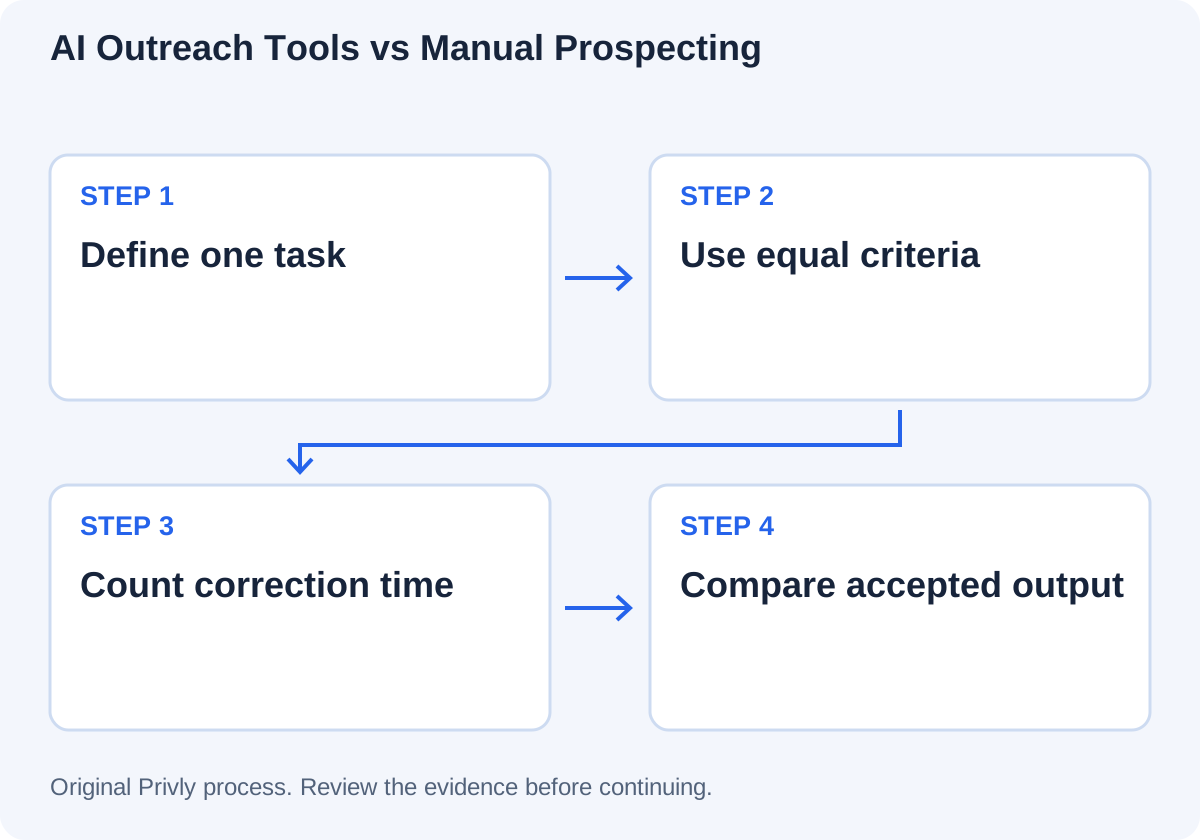
Run a fair pilot with the same acceptance rules
Define the target segment, exclusions, required evidence, and meaning of accepted before either workflow starts. Use a comparable candidate pool and prevent duplicate approaches to the same company. Keep one version of the brief so the second method does not silently receive better instructions.
Where practical, allocate candidates randomly and have a reviewer assess the output without knowing the method. Give both methods equal access to permitted sources. Record time spent learning the tool separately from recurring work so a first setup does not masquerade as a permanent cost.
| Measure | What to record |
|---|---|
| Input | Unique candidates, segment, and brief version. |
| Research quality | Supported facts, wrong identities, missing required fields, and stale evidence. |
| Review outcome | Accepted, needs more research, and excluded, each with a reason. |
| Missed fit | A reviewed sample of deferred and rejected records. |
| Work and cost | Setup, research, corrections, review, handoff, and actual usage charges. |
| Next-stage outcomes | Only if outreach is separately approved: positive replies and qualified calls over the same window. |
Use the agency research-tool worksheet for source and access-control questions.
Worked example: time saved before and after corrections
The following fictional results show why gross speed is not the final decision. Both methods research 30 unique candidates under the same brief. The operator records recurring work; initial setup is tracked separately.
| Measure | Manual research | AI-assisted research |
|---|---|---|
| Initial research | 150 minutes | 45 minutes |
| Review, corrections, and handoff | 30 minutes | 75 minutes |
| Total recurring labor | 180 minutes | 120 minutes |
| Labor at $40/hour | $120 | $80 |
| Allocated tool usage | $0 in this simplified example | $20 |
| Total recurring batch cost | $120 | $100 |
| Accepted unique prospects | 24 | 20 |
| Cost per accepted prospect | $120 / 24 = $5 | $100 / 20 = $5 |
The assisted method uses less recurring labor in this example but has the same cost per accepted prospect. Inspect the errors and missed-fit sample before choosing. These are authored amounts, not vendor prices or evidence that either approach performs better in general.
Decide what to keep and what to change
Use the pilot to choose a specific workflow: perhaps automated company-fact collection with personal signal review, or manual research for complex accounts with assisted drafting afterward. Document what sends a record back for research and who resolves it.
Keep sending outcomes separate from research quality. A better reply rate could reflect audience differences, a stronger offer, or a different sender. Small pilots can reveal operational problems without proving a causal conversion improvement. Repeat on a comparable group before treating a difference as reliable.
Recheck the workflow when the client, offer, sources, or product requirements change. Automation built around an old brief can repeat yesterday’s assumptions more consistently than a person would.
Questions about AI versus manual prospecting
Clarify your target first with Privly’s free ICP identifier, then compare workflows against the same reviewed profile.
Research and source notes
Sources reviewed October 23, 2026. Examples and calculations are authored illustrations; vendor documentation describes capabilities rather than comparative performance.
 CASL
CASLCASL and Outbound Sales: Email and LinkedIn Prospecting in Canada
Review Canadian outbound email and LinkedIn messaging under CASL with official sources, consent and exemption distinctions, and a practical evidence checklist.
October 23, 2026 · Zyaam Ali Canadian B2B
Best LinkedIn Prospecting and Outreach Tools for Canadian Teams
Choose LinkedIn prospecting tools for a Canadian team with a sourced shortlist, CAD pricing context, review controls, and a practical selection worksheet.
October 23, 2026 · Giress Kenn LinkedIn Outreach
How to Increase Your LinkedIn Reply Rate
Diagnose LinkedIn reply rates with clear denominators, a worked funnel, original message revisions, and a practical experiment worksheet.
October 23, 2026 · Giress Kenn