

AI Lead Generation for Agencies: From Research to Reviewed Prospects
Published · Giress Kenn
Practical guidance for founders, B2B teams, and small agencies turning buyer signals into reviewed next actions.
Photo by Vitaly Gariev on Unsplash
An AI tool returns a full prospect list for your client. The summaries sound convincing, but some sources are old, several companies fail the brief, and nobody knows which claims are safe to use in outreach. AI lead generation for agencies works better when you define the research output before choosing the software. This guide shows how to compare tools, request evidence, review a prospect batch, and calculate the cost of a list your team can actually use.
What AI lead generation means for an agency
AI lead generation uses software to help find potential buyers, research their situation, organize the evidence, and prepare a next action. For an agency delivering work to clients, a useful output is a reviewed prospect record: the right company and person, a supported reason for inclusion, unresolved questions, and a clear decision about what happens next.
Separate four jobs when choosing a tool. Discovery finds candidate companies or people. Enrichment adds information such as a role or contact detail. Qualification checks the client’s requirements against evidence. Sending delivers an approved message through a chosen channel. A tool can help with several jobs, but completing one does not complete the others.
Decide whose pipeline you are building, too. Finding clients for your agency uses your own offer and exclusions. Generating leads for a client uses that client’s context, permissions, and approval agreement. Keep those briefs separate even if the same operator does the work.
What current research tools can do
Evaluate a specific research task before comparing feature lists. These documented capabilities illustrate different starting points; your own client brief determines whether their output is useful.
| Starting point | What the documentation describes | What your agency should inspect |
|---|---|---|
| Clay: web research | AI table actions and Claygents can research websites and extract information into a table. | Can a reviewer trace the answer to a current source for the correct company? |
| Apollo: AI research | Templates or custom prompts research people and companies, with results saved in research fields. | Does the answer resolve your actual qualification question, with unknowns preserved? |
| HubSpot: lead scoring | Fit and engagement scores evaluate record properties and actions separately or together. | Which inputs are verified facts, and which merely record activity? |
A company description can establish what a business does. It cannot establish that its operations director is currently buying software. Ask the research system to show the source behind each important claim, then inspect it. If the source is unavailable, keep the answer unconfirmed rather than turning fluent wording into a qualification decision.
Start with an evidence brief for one client
Write the client’s offer, target company, relevant role, delivery requirements, and exclusions before running research. Add the question you want answered and the evidence that would support it. This makes it possible to compare two tools on the same task.
| Field | What to retain |
|---|---|
| Identity | Company website, person’s profile, current role, and client brief version. |
| Observed evidence | Source URL, publication date when available, date checked, and relevant excerpt. |
| Interpretation | Why the observation may connect to this client’s offer. |
| Unknowns | Missing requirements, conflicting sources, and questions for the buyer. |
| Review decision | Accept for outreach review, research further, or exclude, with a reason and reviewer. |
Keep fit and intent separate with the B2B lead-scoring worksheet. An accepted research record means your team has enough context to consider an approach; it does not mean the buyer has agreed to a meeting.
Use this AI lead generation tool selection worksheet
Copy the worksheet into your evaluation notes. For each tool, record demonstrated, needs configuration, or unverified beside each row, then attach the evidence. Mark essential requirements before the demo. A strong message generator should not compensate for an essential client-access or evidence requirement that fails.
| Requirement | Ask the vendor to demonstrate | Record in your worksheet |
|---|---|---|
| Source traceability | Open the original source behind a qualification claim. | URL, source date, correct identity, and what happens when access fails. |
| Unknown answers | Research a case with insufficient or contradictory evidence. | Whether it preserves uncertainty instead of inventing a confident answer. |
| Client separation | Switch clients and show the operator’s and client reviewer’s access. | What each role can see, change, export, and send; scope of shared templates. |
| Review controls | Inspect a result and stop it from reaching outreach. | Reviewer permissions, editable output, and the actual path to sending. |
| Duplicate handling | Process the same person twice and check an existing account. | Matching key, cross-list scope, and how exclusions are applied. |
| Handoff | Export a reviewed selection or demonstrate the required integration. | Actual fields, missing context, destination mapping, and next owner. |
| Usage and cost | Preview research, inspect usage, and explain reruns or failures. | Seats, workspaces, research units, enrichment, exports, and operator time. |
| Data handling | Explain which client data reaches which provider and how it is removed. | Current documentation, access controls, retention, and deletion process. |
For the workspace and sender questions, use the multi-client LinkedIn outreach guide. Check exclusion scope explicitly: a filter in one workspace may not coordinate another client’s campaign.
Ask a narrow research question
Give the tool one decision to support. Include the verified company domain or profile, the client’s question, and a required output structure. Separate observable statements from your interpretation. Test the prompt on a case you understand before applying it to a full list.
Inspect the linked page and the surrounding context. A sentence about a problem at a previous employer may not describe the current company. A repeated press release is still one event. If two sources disagree about a person’s role, resolve the identity before using either in a message.
A prompt is an instruction, not proof that the system followed it. Your worksheet should retain the reviewed evidence and decision outside the prompt history, in the client’s agreed research record.
Review the output before enriching or writing at scale
Resolve duplicate identities first. Check the client’s required facts and exclusions, then inspect the source behind the proposed reason for outreach. Add optional contact enrichment when it serves an accepted next step; filling every available field can consume budget without resolving the qualification question.
Keep three decisions visible: accept for outreach review, research further, or exclude. Missing evidence belongs in research further when it could change the decision. A failed requirement belongs in exclude. Neither should disappear into a generic low-confidence label that the next operator has to interpret.
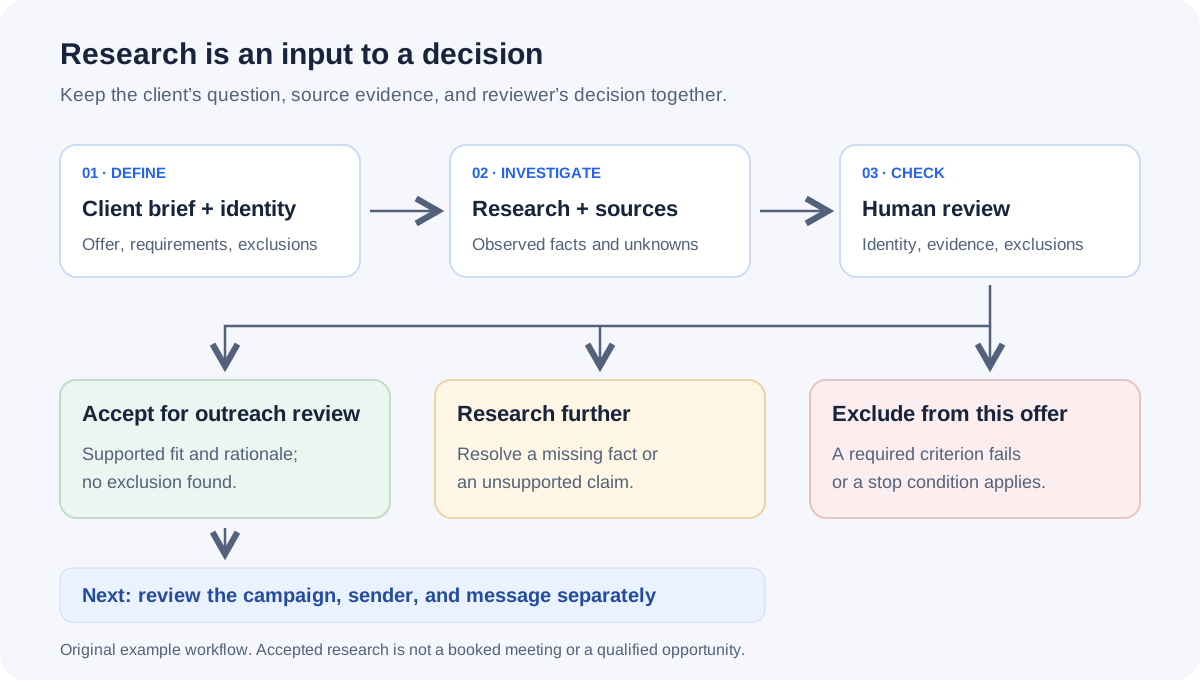
| Research result | Reviewer finding | Decision |
|---|---|---|
| A RevOps leader describes reconciling pipeline reports this month. | Source and role match; company fits; no exclusion found in the client’s records. | Accept for outreach review; budget and timing remain open. |
| A finance director is labeled ‘actively evaluating reporting tools.’ | The linked source only announces funding; no evaluation statement supports the label. | Research further; remove the unsupported claim. |
| An operations lead asks for a reporting integration. | The required system is outside the client’s supported scope. | Exclude from this offer, despite a relevant problem. |
Review some deferred and rejected records too. Otherwise you can spot unsuitable accepted leads while missing suitable people the tool discarded. Record the disagreement and its cause before changing the brief or prompt.
Calculate cost per reviewed, accepted prospect
Compare tools using the work your agency must deliver. Include the batch’s allocated subscription cost, research and enrichment charges, and operator time for setup, source checking, corrections, and handoff. Keep credits separate from money until you know the provider’s current billing rules.
Usage can grow with the number of questions as well as the list size. Apollo’s AI research overview currently counts research runs by record and output column. Estimate the fields you need, check rerun behavior, and inspect the account’s current usage terms before expanding a batch.
| Measure | Example value | Meaning |
|---|---|---|
| Raw rows returned | 50 | Includes repeated identities. |
| Unique prospects reviewed | 40 | Ten duplicate rows removed. |
| Final decisions | 24 accepted; 10 need research; 6 excluded | Accepted means ready for outreach review under the brief. |
| Allocated software and usage | $96 | Illustrative batch cost, not a vendor price. |
| Operator work | 2 hours at $45 per hour = $90 | Includes setup, checking, corrections, and handoff. |
| Total batch cost | $96 + $90 = $186 | Cost of this research batch. |
| Cost per accepted prospect | $186 ÷ 24 = $7.75 | Uses accepted unique prospects, not raw rows. |
Dividing by 50 raw rows would give $3.72 and hide the review outcome. The 24 accepted prospects are not 24 meetings. If further research later accepts more people, record its additional cost and update that batch’s accepted count together. Keep sending and meeting outcomes in their own reports.
Use the agency capacity guide when turning review time into a staffing plan. These figures illustrate the calculation; your client mix, tools, and review requirements determine actual costs.
Keep research acceptance separate from campaign approval
An accepted prospect still needs the correct client offer, sender, supported message, exclusions, and next action. In Privly, review the business profile, organize the selected leads into a list, and review campaign previews using the available lead context. Keep each client’s work in its own workspace.
When exporting selected Privly leads, carry the evidence and approval notes separately: the current CSV contains Name, Headline, Location, LinkedIn URL, ICP fit, Email, and Email verified at. It does not contain the complete research record or conversation. Confirm what the receiving team needs before handing over the file.
The agency campaign playbook covers approval and delivery after research. Review the actual sending method against LinkedIn’s software and automation policy; a research capability or client approval does not establish platform permission to automate activity.
Common mistakes when choosing agency prospecting software
- Comparing the number of rows returned while ignoring duplicates, missing sources, and rejected prospects.
- Letting an AI summary imply buying intent that the linked source never expressed.
- Running optional enrichment on the whole list before checking required customer fit.
- Reusing one client’s examples or proof in another client’s research context.
- Accepting a small sample without inspecting uncertain results and recording the reviewer’s time.
- Assuming a research export includes approval history, full evidence, and the next sales owner.
AI lead generation questions from agencies
Which AI lead generation tool is best for an agency?
Start with the missing job in your workflow. A team without a candidate source needs discovery; one with a list but weak evidence needs research; one losing context at delivery needs a clearer handoff. Demonstrate your essential requirements with the worksheet, then compare accepted output, review effort, and cost. The tools documented here illustrate capabilities rather than a tested ranking.
Can AI qualify a lead without a sales conversation?
It can help check observable fit and summarize evidence of a relevant problem. Budget, approval authority, requirements, and timing may still need a buyer conversation. Label the result according to what was actually confirmed, rather than calling every promising research record sales-qualified.
How do we handle a missing source?
Keep the claim unconfirmed. Search for an accessible primary source or remove the claim from the outreach rationale. If the missing fact is required for fit, defer the prospect. If it is optional, decide whether the remaining verified context supports a useful approach.
Should every client use the same research prompt?
Reuse the output structure and review checklist. Keep the offer, target, required evidence, exclusions, and permitted claims specific to each client. Recheck the prompt when the brief changes, and retain the version used for the research batch.
Start with a brief your team can review
Use Privly’s free ICP identifier to create a starting customer profile from the client’s website. Review the suggested audience and exclusions with the client, then use the evidence brief and selection worksheet above to evaluate your next research tool.
Research and source notes
Sources reviewed October 22, 2026. The brief, prompt, review examples, and cost calculation are original illustrations. Vendor documentation describes capabilities; the article does not report a comparative product test.
- Clay AI documentation — web-research and table-action capabilities.
- Apollo research guidance and research usage overview — research fields and usage accounting; both updated September 25, 2026.
- HubSpot lead scoring — fit and engagement terminology.
- LinkedIn software policy — platform requirements for third-party tools.
 CASL
CASLCASL and Outbound Sales: Email and LinkedIn Prospecting in Canada
Review Canadian outbound email and LinkedIn messaging under CASL with official sources, consent and exemption distinctions, and a practical evidence checklist.
October 23, 2026 · Zyaam Ali Canadian B2B
Best LinkedIn Prospecting and Outreach Tools for Canadian Teams
Choose LinkedIn prospecting tools for a Canadian team with a sourced shortlist, CAD pricing context, review controls, and a practical selection worksheet.
October 23, 2026 · Giress Kenn AI Prospecting
AI Outreach Tools vs Manual Prospecting: Which Workflow Fits?
Compare AI-assisted and manual prospecting by task, review effort, evidence quality, and cost with a fair pilot plan and worked example.
October 23, 2026 · Zyaam Ali