

Privly for Revenue Operations Teams

Photo by Vitaly Gariev on Unsplash
Sales needs more than a name and a fit label. Give your team a consistent way to review prospects, understand why they matter, and carry the conversation into the next action. Privly brings LinkedIn research, lead lists, campaigns, and replies into your workspace; RevOps sets the qualification and handoff agreement that connects them.
Give prospecting one qualification standard
Revenue operations teams need a consistent answer to a simple question: why should sales spend time on this person? A job title, an activity label, and a positive reply answer different parts of that question. When teams treat them as interchangeable, the receiving rep has to qualify the same prospect again.
Use Privly to review a business profile, research relevant LinkedIn prospects, organize leads, and prepare outreach in the same workspace. Your RevOps team defines what counts as fit, what still needs evidence, and when a conversation is ready for a sales handoff. Start with one offer and one audience so everyone applies the same rules.
Keep fit and activity distinct. HubSpot’s scoring documentation separates demographic fit from engagement actions. For your prospect review, add a separate question: what evidence shows a relevant problem or an active evaluation? A click or a connection acceptance alone does not establish either.
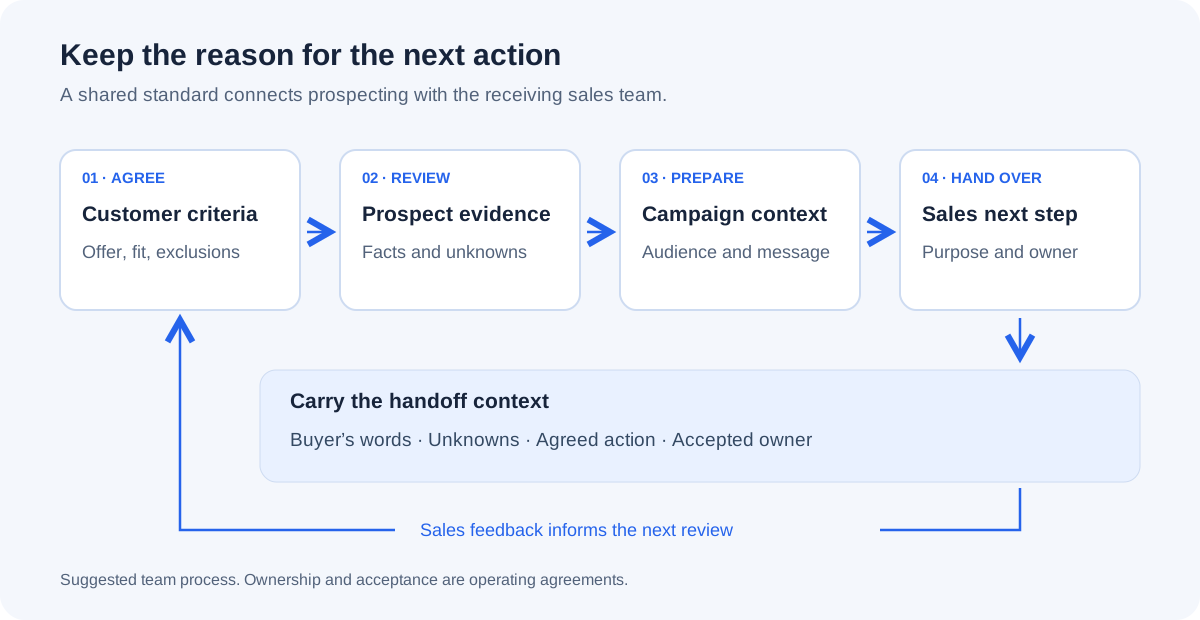
Separate a good fit from a sales-ready conversation
Before the first campaign, agree the required customer characteristics and exclusions with sales. Review the offer, audience, and exclusions in the business profile. Keep unresolved requirements visible in your review notes; a missing answer should not become a confident claim in a message.
Use the following checklist alongside Privly. These are suggested review decisions, not additional product statuses or an automatic routing engine.
| Review decision | Evidence needed | Next action |
|---|---|---|
| Research further | A required fact about the company, role, or delivery requirement is missing. | Verify the missing fact before selecting the person for this offer. |
| Consider outreach | The person fits the audience and the available context supports a useful, accurate approach. | Review the audience and message; keep purchase timing unknown unless confirmed. |
| Prepare a sales handoff | The buyer has confirmed a relevant reason to talk and agreed to a specific next step. | Send the context and open questions to a named owner; ask them to accept. |
| Exclude or stop | A required criterion fails, the offer is unsuitable, or the person asks not to be contacted. | Exclude the person from this campaign and honor the stop request. |
If you need a scoring worksheet, use the B2B lead scoring guide. It shows how to separate fit from intent, preserve unknowns, and make exclusions override a score. Keep any CRM lifecycle definitions in your agreed operating process.
Carry the same context into the campaign
Save reviewed leads in a list and select the intended campaign audience. Check existing customers, active sales conversations, exclusions, and previous stop requests against your team’s records before launch. A new list is not proof that every person is eligible for another approach.
Review the campaign goal, sender, sequence, message previews, and execution mode. Each message should match the evidence you actually reviewed. If someone described a reporting problem, respond to that problem without claiming that they have budget or are replacing their current system.
Use Messages to review replies and their campaign context. Agree who watches the inbox and how quickly they act. When a reply changes the qualification picture, update your handoff notes before passing the conversation to sales.
Follow the campaign setup guide for the product steps. Confirm workspace access and sender permissions with the workspace access guide before delegating the work.
Hand over the buyer’s reason for talking
A list of names is useful for prospecting. A sales conversation needs more: the buyer’s stated problem, what they agreed to, what remains unknown, and who takes the next action. Keep that summary in your agreed handoff record and give the receiving owner access to the relevant conversation.
The following fictional example shows the distinction. It is an operating template, not a customer result or a field automatically filled by Privly.
- Identify the person, company, campaign, and conversation; include the date of the relevant evidence.
- Separate the buyer’s actual words from your interpretation of the opportunity.
- List confirmed requirements, exclusions checked, and questions still unanswered.
- Record the agreed next step, promised material, receiving owner, and their acceptance.
- After the next step, record the outcome and reason in the team’s agreed sales record.
For meeting purpose, scheduling, and post-call outcomes, use the LinkedIn sales-call handoff guide. A positive reply, a booked call, and a qualified opportunity should remain separate outcomes.
Make the export useful to the receiving team
Privly’s selected-lead CSV contains Name, Headline, Location, LinkedIn URL, ICP fit, Email, and Email verified at. Email can be blank. The export does not include the full conversation, qualification evidence, campaign name, receiving owner, or CRM record ID. Carry those details in a separate handoff record where needed.
Before importing, agree how each column maps to the destination and how existing records will be matched. Keep the ICP fit label’s meaning explicit; do not silently translate it into your CRM’s sales-qualified stage. A LinkedIn profile link helps a person identify a prospect, but it is not automatically a CRM import key.
For example, HubSpot’s deduplication documentation describes matching contacts by email, Record ID, or an appropriate unique property during import. Rows without an email or other unique identifier can create new contacts. Check the destination’s import requirements and resolve unmatched records before a bulk import. These are HubSpot rules, not a promise that Privly synchronizes those fields.
| Detail | Team decision |
|---|---|
| Selection | Which reviewed list or campaign audience is being handed over, and when? |
| Identity | Which destination identifier matches an existing person or company? |
| Context | Where will the buyer’s words, source dates, unknowns, and commitments live? |
| Ownership | Who accepts the next action, and when will the outreach owner follow up? |
| Feedback | Where will sales record accepted, needs research, or unsuitable, with a reason? |
Review handoff quality with sales
Review a defined group of handed-over prospects over an agreed period. Count who was accepted, who needed more research, and who was unsuitable, with a reason for each decision. A slow response from the receiving team is a different problem from a missing buyer requirement.
Discuss those decisions with sales before adjusting the business profile or campaign audience. If the same requirement is repeatedly missing, add it to the next prospect review. If the context was complete but the next action had no owner, fix the handoff agreement. Track booked, held, and qualified calls separately in your sales records.
Questions from revenue operations teams
Does Privly replace our CRM?
Use Privly for prospect research, reviewed leads, campaigns, and conversations. Keep your CRM’s lifecycle stages, opportunity records, forecasting, and ownership rules in the system your team has agreed to use. This workflow uses a reviewed CSV handoff; it does not depend on automatic CRM synchronization.
Can we use our own qualification criteria?
Review the business profile’s audience and exclusions around your offer, then apply your team’s qualification checklist to the available evidence. The example checklist on this page is a team process; it does not create custom lifecycle stages, scoring fields, or routing rules in Privly.
Who owns a reply after the handoff?
Name the receiving owner in your operating agreement and ask them to accept the next step. Until they accept, keep the outreach owner responsible for follow-up. Workspace access lets teammates participate according to their permissions; it does not establish this acceptance process automatically.
Where should we start?
Choose one offer, one audience, and one receiving sales owner. Review the customer profile, agree the qualification checklist, and prepare a small reviewed lead selection. Check the handoff together before expanding the process to more campaigns.